
Process automation potential: which step pays off?
Stellwerk shows your core processes as a rail network plan. Every process step gets a signal: automate, AI agent with sign-off or leave with people. You also see savings, payback and a timetable in waves.
What the tool shows
Most lead time is waiting, not work.
In office processes that have grown over years, real work typically makes up 5 to 15% of lead time. The rest of the time a case waits at hand-offs. Stellwerk makes that visible and calculates where automation and AI agents really pay off.
You enter
- +Processes with their steps, roles and systems
- +Processing time per case and waiting time before each step
- +Cases per month, exceptions and error rates
- +How structured the inputs and how rule-based the decisions are
You get
- →Animated network plan comparing current and target state
- →Signal per step: Green automate, Amber AI agent with sign-off, Red people
- →Hours freed, savings in euros and payback for each step
- →Timetable in three waves with break-even and a board paper
Method
How Stellwerk calculates.
Every figure can be traced. The tool gives the formula for every number; here are the most important ones.
Calculation
- +Green: structured inputs, rule-based, under 15% exceptions
- +Red: judgement call and at least 30% exceptions; everything else Amber
- +Flow efficiency = processing time ÷ lead time
- +Payback = implementation effort ÷ monthly savings
Assumptions and limits
- →Wave 1 pays back within 6, wave 2 within 12, wave 3 within 36 months
- →Steps with a longer payback are deferred
- →In the target state, waiting times only fall between steps on the timetable
- →Conservative: processing time stays unchanged within lead time
Example
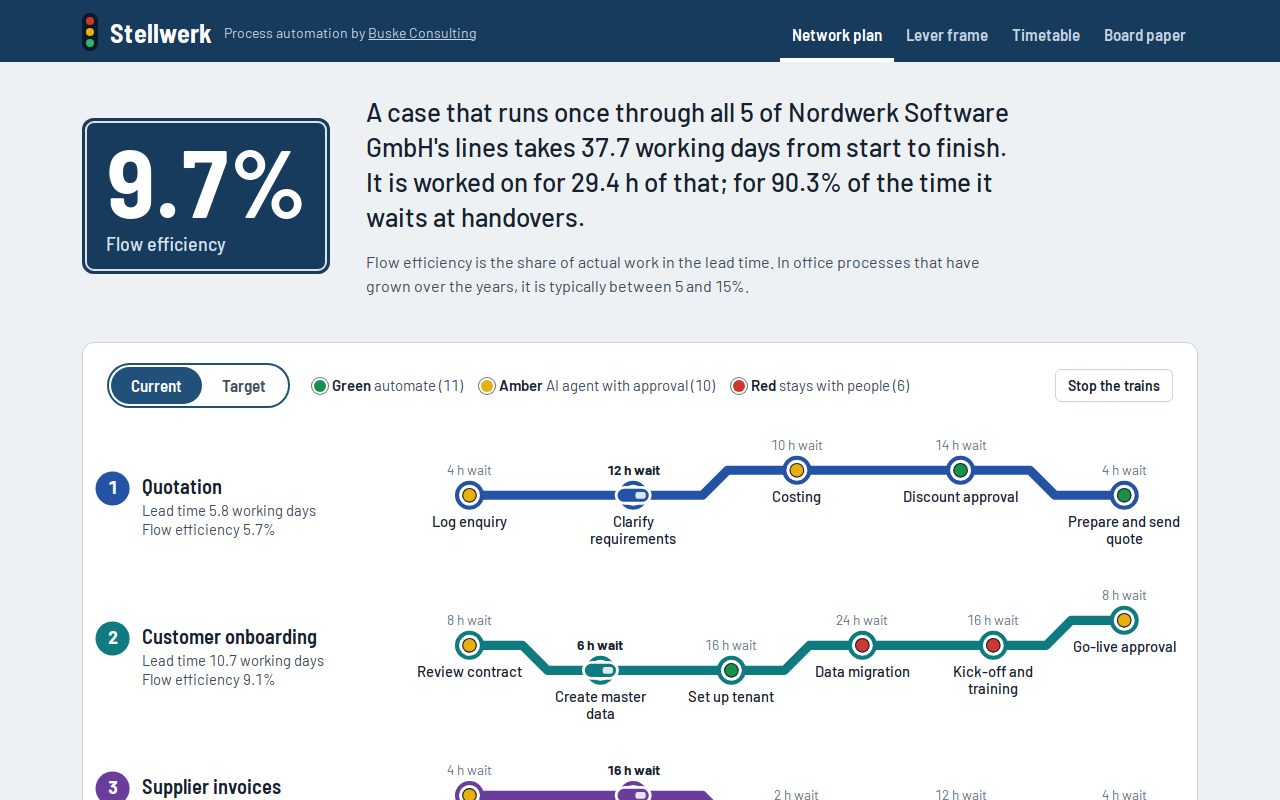
Example: 9.7% flow efficiency.
A case that runs once through all five core processes of the fictitious Nordwerk Software GmbH is under way for 37.7 working days. It is worked on for 29.4 hours of that time; 90% of the time it waits at hand-offs. Of 27 steps, 11 are green, 10 amber and 6 stay with people.
Frequently asked questions
Questions about Stellwerk.
What is flow efficiency?
The share of a case’s total lead time during which someone actually works on it. It shows whether a process gets faster when people work faster, or only when hand-offs are removed.
When is an AI agent better than classic automation?
When inputs are partly unstructured or decisions need judgement, but exceptions stay limited. The agent then prepares and a person signs off. Stellwerk marks these steps amber.
How realistic are the savings?
Stellwerk assumes fixed automation rates of 80% for green and 50% for amber steps, plus an effort per connected system. All assumptions are disclosed in the tool and can be adjusted.
Who sees my process data?
Nobody but you. Stellwerk calculates entirely in your browser; you can export your data as a file and load it again.
How do I calculate the automation potential of a process?
For each step from case volume, processing time and the share that can be automated. That gives hours freed and savings in euros; divided into the implementation effort, it gives the payback. Stellwerk calculates this for all steps at once.
Which process steps are best to start with?
Steps with many similar cases, structured inputs and few exceptions. Stellwerk assigns them to wave 1 if they pay back within six months.
From network plan to an implementation timetable.
In a free 30-minute initial call we review your assumptions and discuss how the self-assessment becomes a reliable diagnosis.